
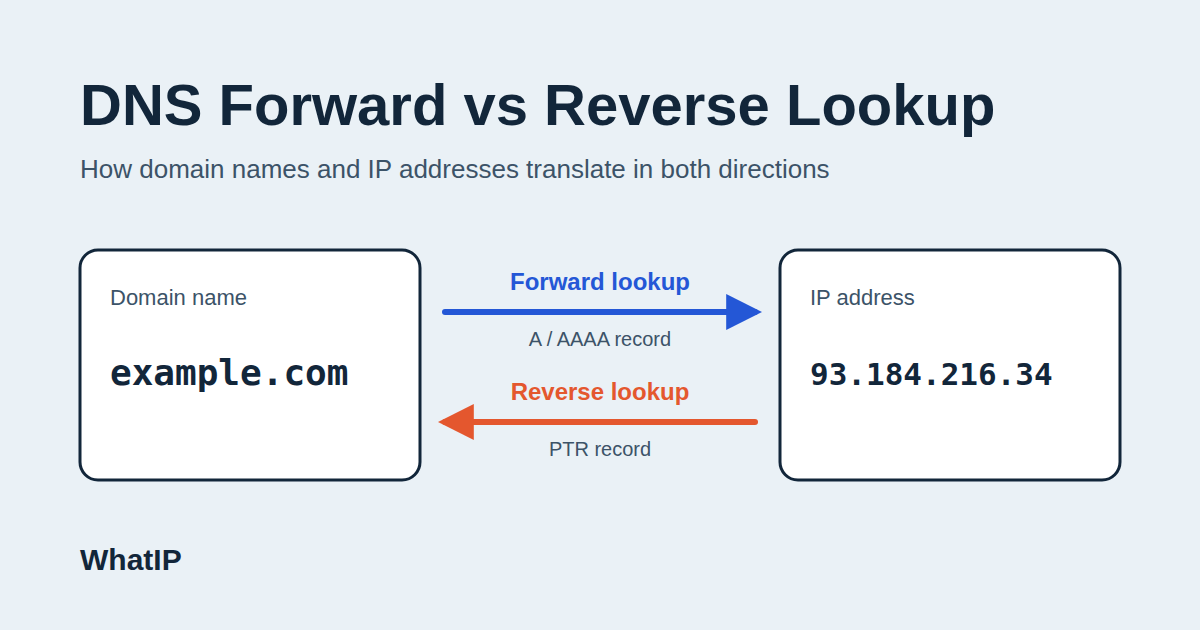
A DNS forward lookup takes a domain name (like example.com) and translates it into an IP address, allowing browsers and apps to locate a server. On the flip side, a DNS reverse lookup does the reverse: it converts an IP address back into a domain name using PTR records found in the in-addr.arpa or ip6.arpa zones. Forward lookups are essential for everyday web browsing and email delivery, while reverse lookups play a key role in email authentication, network troubleshooting, and security investigations.
Every time you visit a website, send an email, or connect to a server, the Domain Name System (DNS) is hard at work behind the scenes. Grasping the difference between forward DNS lookups and reverse DNS lookups is crucial for website owners, developers, and network administrators. It helps them tackle connectivity issues, enhance email deliverability, and investigate any suspicious traffic. This guide will walk you through both processes, how they function, the records involved, and when to use each. Plus, you can check out the free tools at WhatIP to run your own lookups.
What Is a DNS Lookup?
A DNS lookup (also known as a DNS query or DNS resolution) is the process of querying a DNS server for information about a domain name or IP address. While computers communicate using numeric IP addresses, humans prefer names. DNS serves as the bridge between the two, functioning like the internet’s phone book.
Why DNS Resolution Matters
Without DNS resolution, you’d have to memorize numerical addresses like 93.184.216.34 instead of simply typing in a domain name. DNS also facilitates load balancing, email routing, and service discovery, making it a vital component of internet infrastructure.
The Two Directions of DNS Queries
Without DNS resolution, you’d have to memorize numerical addresses like 93.184.216.34 instead of simply typing in a domain name. DNS also facilitates load balancing, email routing, and service discovery, making it a vital component of internet infrastructure.
What Is a DNS Forward Lookup?
A forward DNS lookup, also known as forward DNS resolution, is the process of translating a hostname or domain name into its corresponding IP address. This is the most common type of DNS query and occurs every time you visit a website.
How Forward DNS Lookup Works Step by Step
When you enter a domain into your browser, here’s what happens:
- Local cache check: Your browser and operating system first check if they already have the answer stored.
- Recursive resolver: If they don’t, the request is sent to a recursive DNS resolver, typically provided by your ISP or a public service like Google DNS or Cloudflare.
- Root server: The resolver queries a root name server to find out which servers manage the top-level domain (like .com).
- TLD server: The TLD name server directs the resolver to the authoritative name server for the specific domain.
- Authoritative name server: This server provides the final answer, such as the A or AAAA record that contains the IP address.
- Response and caching: The resolver sends the IP back to your device and caches it for the duration of the record’s TTL (time to live).
DNS Records Used in Forward Lookup
Forward lookups depend on several types of records stored in a domain’s forward lookup zone:
A Record (IPv4)
An A record links a hostname to an IPv4 address. For instance, www.example.com might resolve to 192.0.2.10.
AAAA Record (IPv6)
An AAAA record connects a hostname to an IPv6 address, like 2001:db8::1.
CNAME Record
A CNAME record creates an alias from one hostname to another, allowing the resolver to follow the chain until it finds an A or AAAA record.
MX Record
An MX record indicates to mail servers where to send emails for a domain. Forward lookups of MX records are crucial for email routing.
Common Uses of Forward DNS Lookup
Forward lookups are essential for loading websites, connecting to APIs, delivering emails, and accessing cloud services. Every domain you interact with daily relies on this process functioning smoothly.
What Is a DNS Reverse Lookup?
A reverse DNS lookup, often referred to as (rDNS), is the process of translating an IP address back into its corresponding domain name. Instead of asking, “What’s the IP address for this domain?” you flip the question and ask, “Which domain is linked to this IP?”
How Reverse DNS Lookup Works
Reverse DNS operates using specific zones set up for this exact purpose. For IPv4 addresses, the IP is reversed and then tagged with in-addr.arpa. For instance, the IP 192.0.2.10 transforms into 10.2.0.192.in-addr.arpa. The resolver then looks for a PTR record at that address.
When it comes to IPv6, the process is a bit more complex. The address is expanded, with each hexadecimal digit reversed and appended with ip6.arpa, resulting in much longer query names.
The PTR Record Explained
A PTR record, or pointer record, is the type of DNS record used in reverse lookups. It connects an IP address back to a hostname. Unlike A records, which are managed by the domain owner, PTR records are overseen by whoever controls the IP address block—typically your ISP, hosting provider, or cloud service.
Who Controls the Reverse DNS Zone?
This is a crucial detail that often gets overlooked. If you’re renting a server, you usually need to reach out to your hosting provider to set up the PTR record or use a control panel they offer. Your domain registrar typically won’t be able to assist with this.
Common Uses of Reverse DNS Lookup
Reverse lookups play a vital role in email server verification, log analysis, network diagnostics, and security investigations. They’re also frequently utilized by tools like traceroute to show user-friendly hostnames along the network path.
DNS Forward vs Reverse Lookup: Key Differences
While forward and reverse lookups are essentially two sides of the same coin, they serve different purposes, utilize different record types, and have different ownership structures.
Direction and Purpose
A forward lookup answers the question, “Which IP address corresponds to this name?” In contrast, a reverse lookup answers, “Which name is associated with this IP address?”
Record Types
Forward lookups rely on A, AAAA, CNAME, and MX records, while reverse lookups depend on PTR records.
Zone Structure
Forward lookup zones are named after the domain (example.com). Reverse lookup zones use the in-addr.arpa domain for IPv4 and ip6.arpa for IPv6.
Control and Management
You manage forward records through your domain registrar or DNS host. Reverse records are managed by the owner of the IP block, typically your ISP or cloud provider.
Quick Comparison Table
| Feature | Forward Lookup | Reverse Lookup |
|---|---|---|
| Input | Domain name | IP address |
| Output | IP address | Domain name |
| Record type | A, AAAA, CNAME, MX | PTR |
| Zone | example.com | in-addr.arpa / ip6.arpa |
| Managed by | Domain owner | IP address owner |
| Typical use | Browsing, email routing | Email verification, logging, security |
Forward-Confirmed Reverse DNS (FCrDNS)
Forward-confirmed reverse DNS is a handy verification method that brings together two types of lookups. First, it performs a reverse lookup to find the hostname associated with an IP address. Then, it does a forward lookup to ensure that this hostname points back to the same IP. If everything lines up, you can consider the configuration valid.
Why FCrDNS Matters for Email Deliverability
A lot of mail servers, like Gmail and Outlook, check if the sending server’s IP has a valid PTR record that corresponds with its hostname. If it doesn’t, your emails might end up in the spam folder or get rejected altogether. If you’re managing your own mail server, making sure your forward and reverse records match is crucial for good email deliverability, right alongside SPF, DKIM, and DMARC.
Why Reverse DNS Matters for Security and Troubleshooting
Reverse DNS isn’t just a technical detail; it serves practical purposes in various areas.
Email Spam Filtering
Spam filters often flag missing or generic PTR records as red flags. Residential and dynamic IP addresses tend to have generic reverse DNS names, which is a big reason why they often get blocked from sending emails.
Log Analysis and Network Monitoring
Server logs typically show visitors as raw IP addresses. By using reverse lookups, you can convert those into readable hostnames, making it much easier to spot patterns, identify crawlers like Googlebot, or trace any suspicious activity.
Verifying Search Engine Bots
Google suggests verifying Googlebot by doing a reverse lookup on the visiting IP, checking that the hostname ends with googlebot.com or google.com, and then performing a forward lookup to confirm it matches. This is FCrDNS in action, and it helps safeguard your site from fake crawlers.
How to Perform DNS Forward and Reverse Lookups
You can carry out both lookups using command-line tools or free online services.
Using nslookup
On Windows, macOS, and Linux, nslookup is a straightforward option. For a forward lookup, just run nslookup example.com. For a reverse lookup, you’d run nslookup 192.0.2.10.
Using dig
The dig command provides a more in-depth look at DNS records. For a forward lookup, you can simply type dig example.com A. If you need to perform a reverse lookup, just use dig -x 192.0.2.10, and it will automatically create the in-addr.arpa query for you.
Using the host Command
On both Linux and macOS, you can do a forward lookup with host example.com, while host 192.0.2.10 will handle a reverse lookup for you.
Using Online Tools
If you’re not a fan of the command line, there are plenty of online tools that can help you out quickly. For instance, the WhatIP IP lookup tool lets you check details about an IP address, and you can explore the rest of the site for additional network utilities. These browser-based tools are especially handy when you need a quick answer without the hassle of installing anything.
Common DNS Lookup Problems and Fixes
Missing PTR Record
If a reverse lookup doesn’t return any results, it usually means the IP owner hasn’t set up a PTR record. In this case, reach out to your hosting provider and ask them to create one that matches your server’s hostname.
Mismatched Forward and Reverse Records
If the PTR record points to a hostname that doesn’t resolve back to the same IP, you’ll run into FCrDNS issues. Make sure to update either the A record or the PTR record so they align properly.
Slow Propagation and Caching
DNS changes are cached based on TTL values. After you update records, give it some time for the caches to clear before testing again, and consider lowering the TTL ahead of any planned changes.
Multiple PTR Records
Having multiple PTR records for a single IP can create confusion for some systems. This is particularly true for mail servers, where it’s best to stick with one clear PTR record.
Best Practices for DNS Configuration
To ensure reliable identification for any server that sends email, keep your forward and reverse records consistent. Opt for descriptive hostnames instead of generic ones. Regularly review your DNS records, remove any outdated entries, and choose reputable DNS providers that offer redundancy. If you’re managing IPv6, don’t forget to set up ip6.arpa records as well, as they often get overlooked.
Frequently Asked Questions
Is reverse DNS required for every IP address?
Not necessarily. While reverse DNS is optional for most applications, it’s highly recommended for mail servers and any systems that need to verify other services.
Can an IP address have more than one domain?
Absolutely! Many domains can point to a single IP address through A records, which is quite common in shared hosting environments. However, a PTR record typically links an IP to just one primary hostname.
Is a reverse lookup the same as an IP geolocation lookup?
Not quite. A reverse DNS lookup gives you a hostname, while an IP geolocation lookup provides an estimate of the physical location and the network owner associated with that address. They serve different purposes and are often used together.
Conclusion
DNS forward lookups and reverse lookups are two essential components of the same system. Forward lookups convert names into IP addresses, making the internet navigable. On the flip side, reverse lookups translate IP addresses back into names, allowing for server verification, log reading, and email trustworthiness. Understanding how A records, PTR records, and FCrDNS work in harmony can enhance your troubleshooting skills and help secure your infrastructure. Ready to dive in? Head over to WhatIP to look up an IP address and discover what it has to offer!
Want to see this in practice? Check your own connection's IP, location and ISP.
Check my IP address