
WhatIP
What Is NAT? Ultimate Guide to Network Address Translation
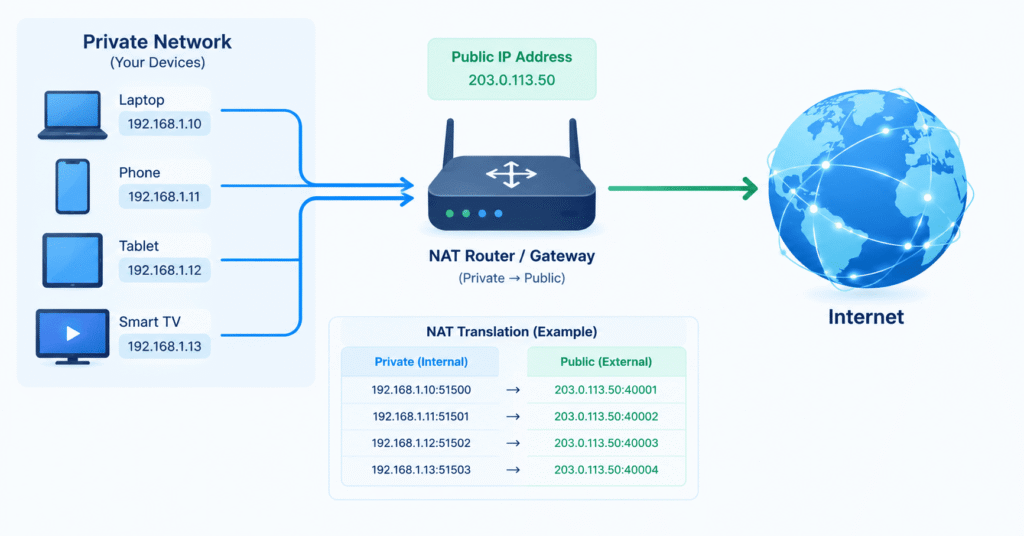
NAT (Network Address Translation) is a networking technology that translates private IP addresses, and often port numbers, into a public IP address so multiple devices on a private network can access the internet through the same public connection.
NAT is commonly used by home routers, business networks, firewalls, cloud gateways, and internet service providers. It helps conserve IPv4 addresses while allowing computers, smartphones, smart TVs, gaming consoles, and other devices with private IP addresses to communicate with websites and online services.
If you want to check your own public IP address, use the WhatIP IP Lookup tool to see your internet-facing IP information.
What Does NAT Stand For?
NAT stands for Network Address Translation. It is a process that changes IP addressing information as network traffic moves between a private network and another network, such as the public internet.
For example, your laptop may have a private IP address such as 192.168.1.10, while your router has a public IP address assigned by your ISP. NAT allows your laptop to access the internet without needing its own public IPv4 address.
NAT Meaning in Simple Terms
In simple terms, NAT works like a translator between your private network and the internet.
Your devices use private IP addresses inside your network. Your router uses a public IP address to communicate with the internet. NAT translates the traffic between these two environments.
This is why several devices in your home can browse the internet at the same time while appearing to use the same public IPv4 address.
Why Is NAT Needed?
The main reason NAT is widely used is the limited number of IPv4 addresses available.
IPv4 uses 32-bit addresses and provides approximately 4.3 billion possible addresses. As the number of internet-connected computers, smartphones, servers, IoT devices, cameras, and other equipment increased, public IPv4 addresses became increasingly scarce.
NAT helps solve this problem by allowing many devices to use private IP addresses while sharing a smaller number of public IPv4 addresses.
Private IP Address Ranges
Common private IPv4 ranges include:
10.0.0.0/8172.16.0.0/12192.168.0.0/16
For example, a home network could contain:
- Laptop:
192.168.1.10 - Phone:
192.168.1.11 - Smart TV:
192.168.1.12 - Gaming console:
192.168.1.13
The router can then translate their connections so they communicate with the internet through a public IP address.
How Does NAT Work?
NAT works by creating a translation between an internal private network connection and an external public connection.
Imagine your computer has the private IP address 192.168.1.20 and your router has the public IP address 203.0.113.50.
When your computer visits a website, the request first travels to your router.
NAT Translation Process
The basic process works like this:
- Your device sends a request using its private IP address.
- The router receives the request.
- NAT changes the private source information to the appropriate public address and, when necessary, port.
- The translated request travels across the internet.
- The website sends a response back to the public IP and port.
- The router checks its NAT translation table.
- The router forwards the response to the correct device inside your private network.
A simplified connection might look like:
192.168.1.20:51500 → 203.0.113.50:40001
The router remembers this mapping so that the returning traffic can be delivered to the correct internal device.
NAT Translation Example
Suppose four devices are connected to one router:
| Device | Private Address | Public Connection |
|---|---|---|
| Laptop | 192.168.1.10:5000 | 203.0.113.50:40001 |
| Phone | 192.168.1.11:5001 | 203.0.113.50:40002 |
| TV | 192.168.1.12:5002 | 203.0.113.50:40003 |
| Console | 192.168.1.13:5003 | 203.0.113.50:40004 |
The devices have different private addresses, but they can share the same public IP address.
What Is the Difference Between Private and Public IP Addresses?
Understanding private and public IP addresses is essential for understanding NAT.
What Is a Private IP Address?
A private IP address is used inside a local network. It identifies a device within that network but is not normally directly routable across the public internet.
Examples include:
192.168.1.2010.0.0.15172.16.5.20
Your router can automatically assign private IP addresses to devices using DHCP.
What Is a Public IP Address?
A public IP address is used for communication across the internet. Your ISP may assign a public IPv4 address to your internet connection, although the exact network arrangement depends on the provider.
When you visit a website, the website normally sees the public-facing IP address associated with your connection rather than your device’s private IP address.
You can check your current internet-facing address using the WhatIP IP Lookup tool.
What Are the Different Types of NAT?
The term NAT type can mean different things depending on the networking technology or application being discussed.
The classic STUN terminology describes four commonly discussed NAT behaviors:
- Full Cone NAT
- Restricted Cone NAT
- Port Restricted Cone NAT
- Symmetric NAT
Modern networking standards use more detailed descriptions of NAT mapping and filtering behavior, so these four categories should not be treated as a complete classification of every modern NAT implementation.
Full Cone NAT
A classic Full Cone NAT creates a consistent external mapping for an internal IP address and port.
Once the mapping exists, external traffic may be able to reach that mapped address and port.
Restricted Cone NAT
Restricted Cone NAT applies additional filtering. Generally, an external source needs to correspond to an address that the internal device has previously communicated with.
Port Restricted Cone NAT
Port Restricted Cone NAT adds another level of filtering. The external source generally needs to match both the destination IP address and destination port previously contacted by the internal device.
Symmetric NAT
Symmetric NAT can create different public mappings depending on the external destination.
This behavior can make peer-to-peer communication and NAT traversal more difficult, which is why NAT type can matter for certain applications and online games.
What Is PAT and How Is It Related to NAT?
PAT stands for Port Address Translation. It is closely associated with NAPT, or Network Address and Port Translation.
PAT allows multiple private devices to share a single public IP address by using different port numbers to distinguish their connections.
NAT vs PAT
The basic difference can be summarized as:
NAT:
Private IP → Public IP
PAT:
Private IP + Port → Public IP + Port
In modern home networks, what people commonly call NAT is frequently a combination of address and port translation.
PAT is also sometimes called NAT overload because many internal devices can use one public IPv4 address at the same time.
Is NAT the Same as a Firewall?
No. NAT and a firewall are different technologies.
NAT translates addresses and ports between networks. A firewall controls which traffic is allowed or blocked according to security rules.
They are often built into the same home router, which can make them seem like the same feature.
NAT vs Firewall
NAT: Handles address and port translation.
Firewall: Filters network traffic according to configured rules.
NAT can make unsolicited inbound connections more difficult, but NAT should not be considered a replacement for a properly configured firewall.
Does NAT Hide Your IP Address?
NAT hides the private IP address of a device from the public internet in normal NAT configurations.
For example, a website will generally not see your laptop’s private address such as 192.168.1.20 as the internet-facing source address. Instead, it sees the public-facing IP address associated with your connection.
However, NAT does not make you anonymous.
Your public IP address can still be visible to websites, online services, and other systems you communicate with.
NAT should therefore not be confused with a VPN, proxy, or anonymity service.
What Is Port Forwarding?
Port forwarding is a router configuration that directs incoming traffic received on a particular public port to a specific device inside a private network.
For example:
Public IP:25565 → 192.168.1.50:25565
Port forwarding can be used for:
- Game servers
- Web servers
- Remote-access services
- Security cameras
- Other applications requiring incoming connections
Why Does Port Forwarding Matter for NAT?
Normally, NAT is designed primarily around connections initiated from inside the private network. Port forwarding creates an explicit path for certain incoming traffic.
If a service is exposed to the internet through port forwarding, it should be properly secured because publicly reachable services can increase the device’s exposure to unwanted traffic.
What Is CGNAT?
CGNAT stands for Carrier-Grade Network Address Translation.
CGNAT occurs when an ISP performs another layer of NAT within its own network. Instead of each customer receiving a dedicated public IPv4 address, multiple customers may share public IPv4 addresses.
A simplified setup can look like:
Your Device → Home Router NAT → ISP CGNAT → Internet
How Does CGNAT Affect Users?
CGNAT can affect applications that require incoming connections, including:
- Port forwarding
- Hosting servers
- Remote access
- Peer-to-peer applications
- Some online gaming configurations
If your router’s WAN address does not match the public IP reported by an external IP lookup service, or if the WAN address belongs to a private or carrier-level address range, your connection may involve another NAT layer.
What Is Double NAT?
Double NAT occurs when two devices on the network perform NAT.
For example:
ISP Router → Personal Router → Computer
If both routers are performing NAT, traffic passes through two translation layers.
Double NAT Problems
Double NAT can sometimes cause problems with:
- Online gaming
- Port forwarding
- Remote access
- VoIP
- Peer-to-peer applications
- Network discovery
A common solution is to configure one router for bridge or passthrough mode, depending on the ISP equipment and network setup.
NAT and Online Gaming
NAT can be particularly noticeable when playing online games.
Multiplayer games and gaming consoles may need peer-to-peer communication, voice chat, matchmaking, or connections to game servers.
What Do Open, Moderate, and Strict NAT Mean?
Gaming platforms may use terms such as:
- Open NAT
- Moderate NAT
- Strict NAT
- NAT Type 1
- NAT Type 2
- NAT Type 3
These labels are not universal networking standards. Different consoles and games can use different definitions.
In general, the NAT classification indicates how easily the gaming device can establish required incoming or peer-to-peer connections through NAT and firewall rules.
NAT and IPv6
NAT is strongly associated with IPv4 because IPv4 has a limited address space.
IPv6 provides a vastly larger address space, so IPv6 does not require NAT in the same way IPv4 networks commonly do.
An IPv6 network can assign globally routable addresses to individual devices while using firewalls to control unwanted traffic.
This means NAT is not generally a fundamental requirement for IPv6 internet connectivity.
NAT Security: Is NAT a Security Feature?
NAT can reduce direct exposure of internal devices because private addresses are not directly routed across the public internet.
However, NAT was designed primarily for address translation and IPv4 connectivity, not as a complete security system.
For better network security, use:
- A properly configured firewall
- Strong router administrator credentials
- Updated router firmware
- Secure Wi-Fi encryption
- Updated operating systems and applications
- Only necessary port-forwarding rules
Avoid exposing unnecessary services directly to the public internet.
How Can You Check Your Public IP?
The easiest way to see your internet-facing IP address is to use an IP lookup service.
Use the WhatIP IP Lookup tool to check your current public IP and available network information.
Your IP address may also provide approximate information about your network or geographic region. However, IP geolocation is not normally an exact representation of your physical location.
Common NAT Problems and Troubleshooting
1. Check for Double NAT
Check the WAN or internet IP address shown by your router. If another router is also performing NAT, you may have a double-NAT configuration.
2. Check for CGNAT
Your ISP may be using Carrier-Grade NAT. If your router does not have a directly reachable public IPv4 address, traditional port forwarding may not work as expected.
3. Check Port Forwarding
Make sure:
- The correct internal IP address is configured.
- The correct port is being forwarded.
- The correct TCP or UDP protocol is selected.
- The required service is running.
- The firewall allows the connection.
4. Check the Firewall
A NAT mapping does not automatically mean that an application will accept incoming traffic. The operating-system firewall or application firewall may still block the connection.
Common NAT Terms You Should Know
Here are some important NAT-related terms:
- NAT: Network Address Translation.
- PAT: Port Address Translation.
- NAPT: Network Address and Port Translation.
- Private IP: An IP address used within a private network.
- Public IP: An internet-facing IP address.
- NAT Gateway: A device or service that performs network address translation.
- CGNAT: Carrier-Grade Network Address Translation performed by an ISP.
- Double NAT: A network with two NAT layers.
- Port Forwarding: A rule that directs incoming traffic to an internal device.
- NAT Traversal: Techniques used to establish communication through NAT.
- STUN: A protocol used to discover public-facing addressing and NAT behavior.
- TURN: A relay mechanism used when direct peer-to-peer communication cannot be established.
- ICE: A framework used to discover and select possible network communication paths.
Frequently Asked Questions About NAT
What is NAT in simple words?
NAT allows devices with private IP addresses to communicate with the internet through a public IP address. A router performs the translation between the private network and the public network.
What is NAT used for?
NAT is used to translate IP addresses and, commonly, port numbers. It allows multiple devices on a private IPv4 network to share a public IP address.
What is NAT in networking?
NAT in networking is the process of translating addressing information between different network address spaces. It is commonly used by routers and gateways to connect private IPv4 networks to public networks.
Does NAT change my public IP?
NAT translates a device’s private IP address into the public-facing address used by the router or gateway. It does not necessarily change the public IP assigned to your internet connection.
Does NAT hide my private IP address?
Yes. In a typical NAT setup, a device’s private IP address is not directly exposed as its internet-facing source address. External services generally see the public-facing IP address.
Is NAT a firewall?
No. NAT and firewalls perform different functions. NAT translates network addresses and ports, while a firewall filters traffic according to security rules.
What is the difference between NAT and PAT?
NAT translates IP addresses. PAT also uses port numbers, allowing multiple private devices to share one public IPv4 address simultaneously.
What is CGNAT?
CGNAT is Carrier-Grade Network Address Translation performed by an ISP. It allows multiple customers to share public IPv4 addresses and can affect port forwarding and incoming connections.
Can NAT affect online gaming?
Yes. NAT behavior can affect multiplayer connectivity, matchmaking, voice chat, hosting, and peer-to-peer communication.
How do I know if I am behind NAT?
If your device has a private address such as 192.168.x.x, 10.x.x.x, or 172.16.x.x, it is using a private network address. You can compare your router’s WAN address with the public IP shown by an external IP lookup service to identify possible additional NAT layers.
Final Takeaway
NAT, or Network Address Translation, allows multiple devices on a private network to communicate with the internet by translating private IP addresses and, commonly, port numbers into public-facing connections.
NAT is an important part of IPv4 networking and explains why devices inside your home or office can have private IP addresses while websites see a public IP address.
Understanding NAT types, NAT vs PAT, private and public IP addresses, port forwarding, CGNAT, double NAT, and NAT for gaming can help you troubleshoot many common connectivity problems.
To see the public IP address used by your internet connection, check it with the WhatIP IP Lookup tool.